Information Fields
Information fields belonging to a Project, Session or Participant can be read, created and modified. They cannot be created or modified independently; instead, they must be supplied when creating or updating one of the above resources. Artifact information fields can only be read.
Information fields cannot be deleted through API operations.
An information field in the API is represented as a JSON object with the following properties:
{
  "fieldName": "string",
  "fieldType": "text",
  "value": "string"
}
The API uses fieldName to match information fields, so field names are guaranteed to be unique within each resource. When creating or modifying a resource with Information Fields, if the supplied fieldName already exists in that resource, its corresponding value will be modified with the supplied value. If the fieldName does not exist in the resource, a new information field will be created, provided a valid fieldType is supplied.
To create an information field, all three properties fieldName, fieldType, and value must be supplied.
fieldType represents the type of the information field. Existing UI field types are mapped to API types as follows:
| UI Type | fieldType | Expected value type |
|---|---|---|
| Name | name |
String |
| Number | number |
Number |
| Date | date |
String (Format YYYY-MM-DD) |
| Checkbox | boolean |
Boolean |
| Single select | single_select |
String |
| Multi select | multi_select |
String [] |
| Participant | participant |
Object [] (id / name property) |
| User | user |
Object [] (id / name/ email property) |
| URL | url |
String |
email |
String | |
| NPS | nps |
Number (Range [1-10]) |
user and participant fields can accept identifiers other than IDs such as name (for participants) or name and email (for users). Although ID based matching is recommended, name or email based matching can be used when necessary. In those cases, a case-insensitive string match is performed.
The following example demonstrates updating an existing Project with information fields.
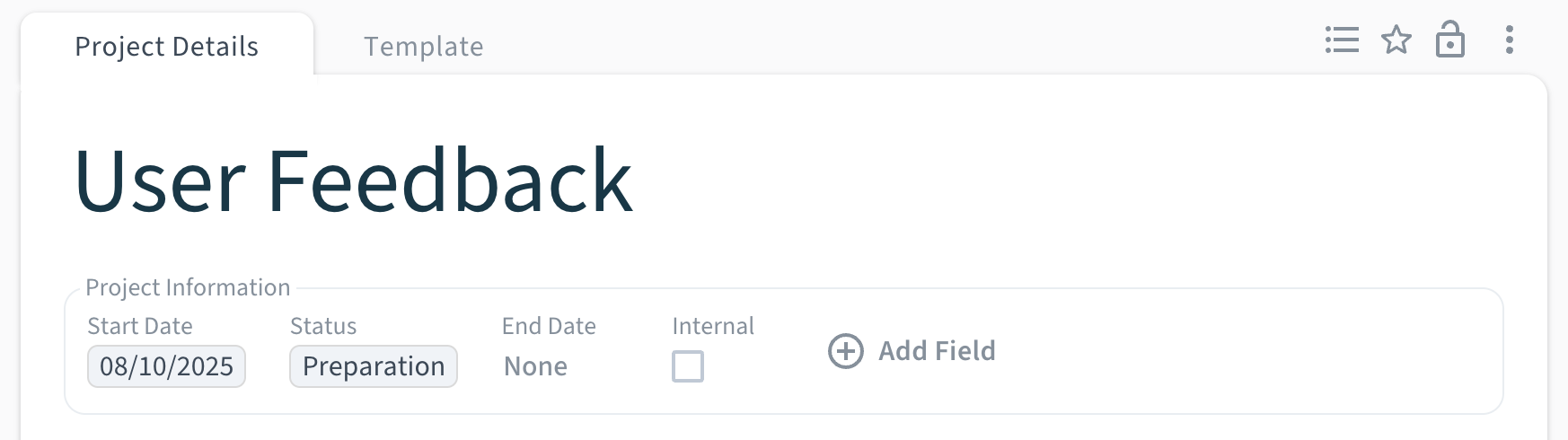
The Project shown above has 4 Information Fields:
-
Start DateoffieldTypedate -
StatusoffieldTypesingle_select -
End DateoffieldTypedate -
InternaloffieldTypeboolean
A GET request to fetch this Project using its id would return the following response.
{
  "id": "t7mY2pQsX9Lw3ZhdVj0K",
  "name": "User Feedback",
  "updatedAt": "2025-10-08T14:09:37.427Z",
  "projectFolderId": "s2nqK0wYh5tOeBkaiHxW",
  "workspaceId": "willoughby",
  "informationFields": [
    {
      "fieldName": "Status",
      "fieldType": "single_select",
      "value": "Preparation"
    },
    {
      "fieldName": "Start Date",
      "fieldType": "date",
      "value": "2025-10-08"
    }
  ],
  "involvedContributorIds": [
    "k7zvUoX3qJmW9aP2eRtgS8LbYnHd"
  ]
}
The informationFields response property only includes entries that have a value set in the resource.
Here’s a sample request body to update this Project :
{
  "informationFields": [
    {
      "fieldName": "Internal",
      "value": true
    },
    {
      "fieldName": "Research Method",
      "fieldType": "single_select",
      "value": "Usability Test"
    }
  ]
}
With this update, the existing information field “Internal” will be set to true (checked in the UI) and a new single_select field called Research Method will be created with the value Usability Test. Here’s the corresponding response for the update request:
{
  "id": "t7mY2pQsX9Lw3ZhdVj0K",
  "name": "User Feedback",
  "updatedAt": "2025-10-08T14:17:26.461Z",
  "projectFolderId": "s2nqK0wYh5tOeBkaiHxW",
  "workspaceId": "willoughby",
  "informationFields": [
    {
      "fieldName": "Research Method",
      "fieldType": "single_select",
      "value": "Usability Test"
    },
    {
      "fieldName": "Status",
      "fieldType": "single_select",
      "value": "Preparation"
    },
    {
      "fieldName": "Start Date",
      "fieldType": "date",
      "value": "2025-10-08"
    },
    {
      "fieldName": "Internal",
      "fieldType": "checkbox",
      "value": true
    }
  ],
  "involvedContributorIds": [
    "k7zvUoX3qJmW9aP2eRtgS8LbYnHd"
  ]
}
Information Fields can also be used to filter and sort list API responses. View the next guide to learn more.